OverviewAll statesWest Virginia
76/100
Grade: B- — A Polished Drupal 10 Build With Strong Foundations and Room to Grow
West Virginia's Department of Education website (wvde.us) is one of the more technically impressive state education agency sites in the country. Built on Drupal 10 with a custom Gesso theme, served through Fastly's CDN with Varnish caching, and delivering sub-100ms time-to-first-byte, it's a site that clearly benefited from a thoughtful modern redesign. The information architecture is clean and audience-focused, with dedicated resource hubs for families, students, educators, and community partners prominently featured on the homepage.
What makes West Virginia's approach particularly effective is how it balances institutional depth with public accessibility. The mega-menu navigation offers logical paths into six top-level sections — Academics, Student Support and Wellness, Educator and Staff Development, Data and School Improvement, Divisions and Offices, and About Us — each expandable with well-organized submenus. Every link we tested returned a clean 200 response. The homepage itself serves as a genuine content hub, featuring spotlights on current programs, recent news, popular pages, upcoming events, and a teacher recruitment call-to-action.
The site's major gaps are the complete absence of multilingual support (not even a Google Translate widget) and a search system that, while functional with over 1,500 indexed pages, lacks any filtering, sorting, or autosuggest capabilities that modern users expect.
Strengths
1. ZoomWV — Comprehensive PreK-12 Data Dashboard
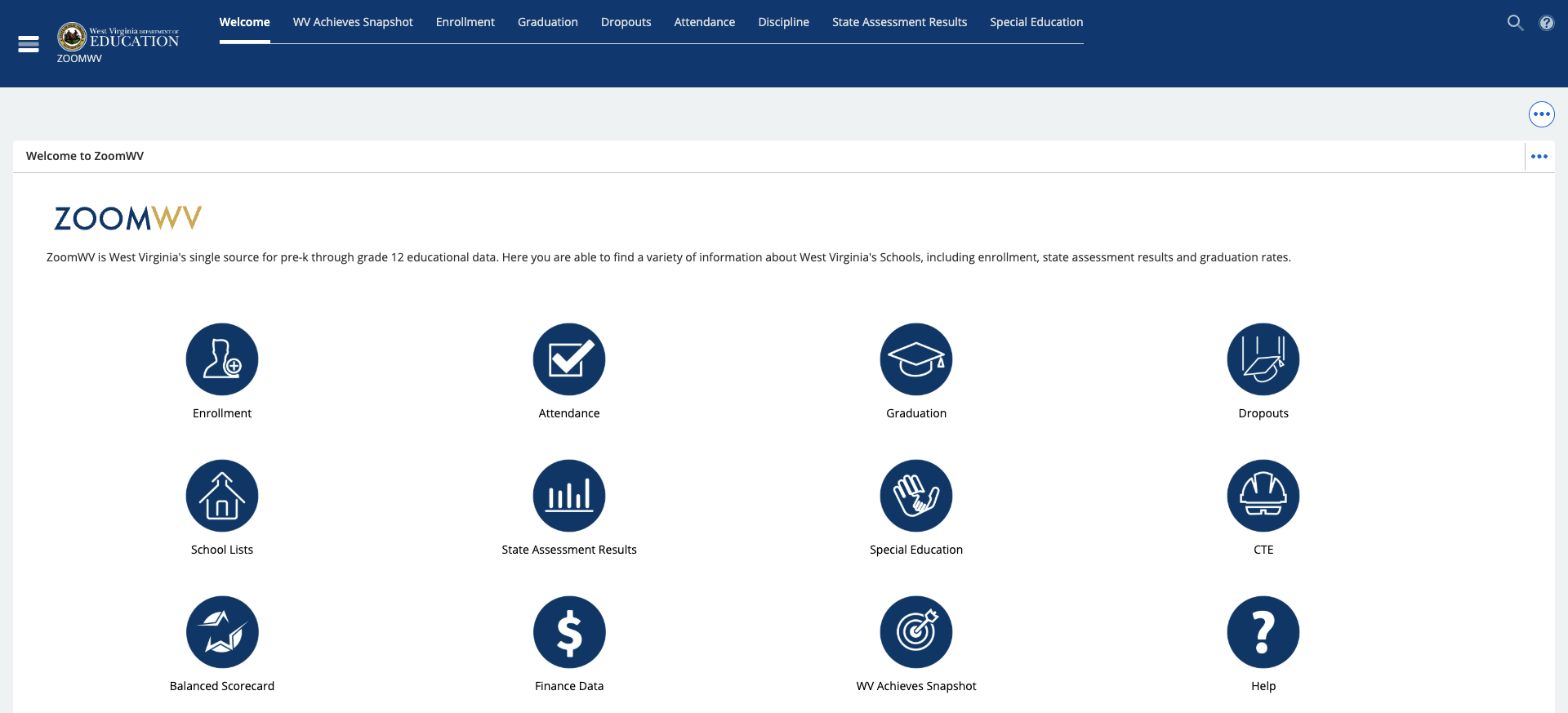
West Virginia's standout data tool is ZoomWV (zoomwv.k12.wv.us), described as the state's "single source for pre-K through grade 12 educational data." The dashboard organizes data across 11 major categories: Enrollment, Attendance, Graduation, Dropouts, School Lists, State Assessment Results, Special Education, CTE, Balanced Scorecard, Finance Data, and WV Achieves Snapshot. Each module offers drill-down capability from state-level to individual school data.
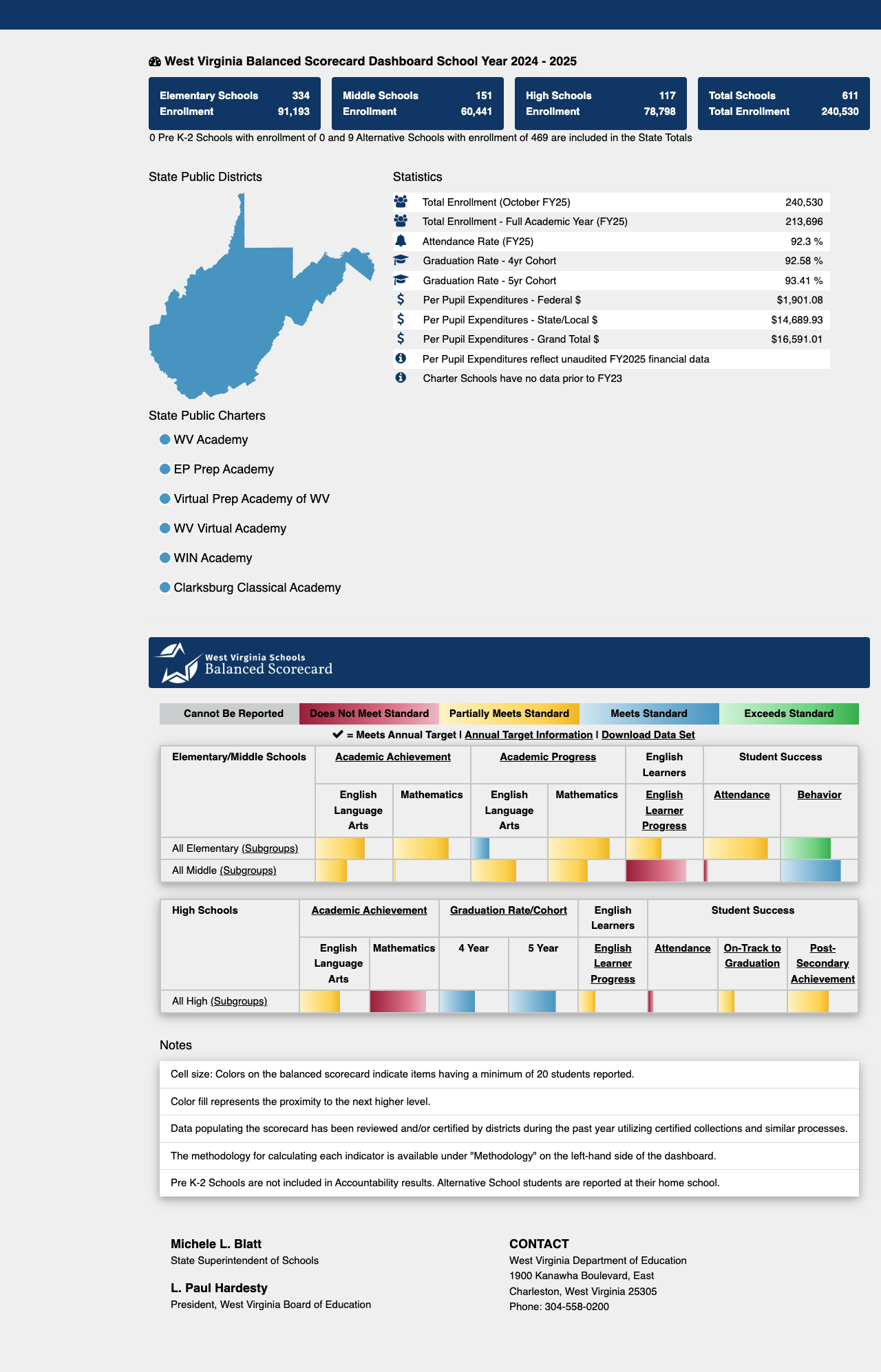
The companion WV Schools' Balanced Scorecard presents 2024-2025 accountability data including enrollment (240,530 total), attendance (92.3%), graduation rates (92.58% four-year cohort), and per-pupil expenditures ($16,591.01). The scorecard breaks down achievement, progress, and student success metrics for elementary/middle and high schools with a clear color-coded rating system.
2. Audience-Organized Family Resources
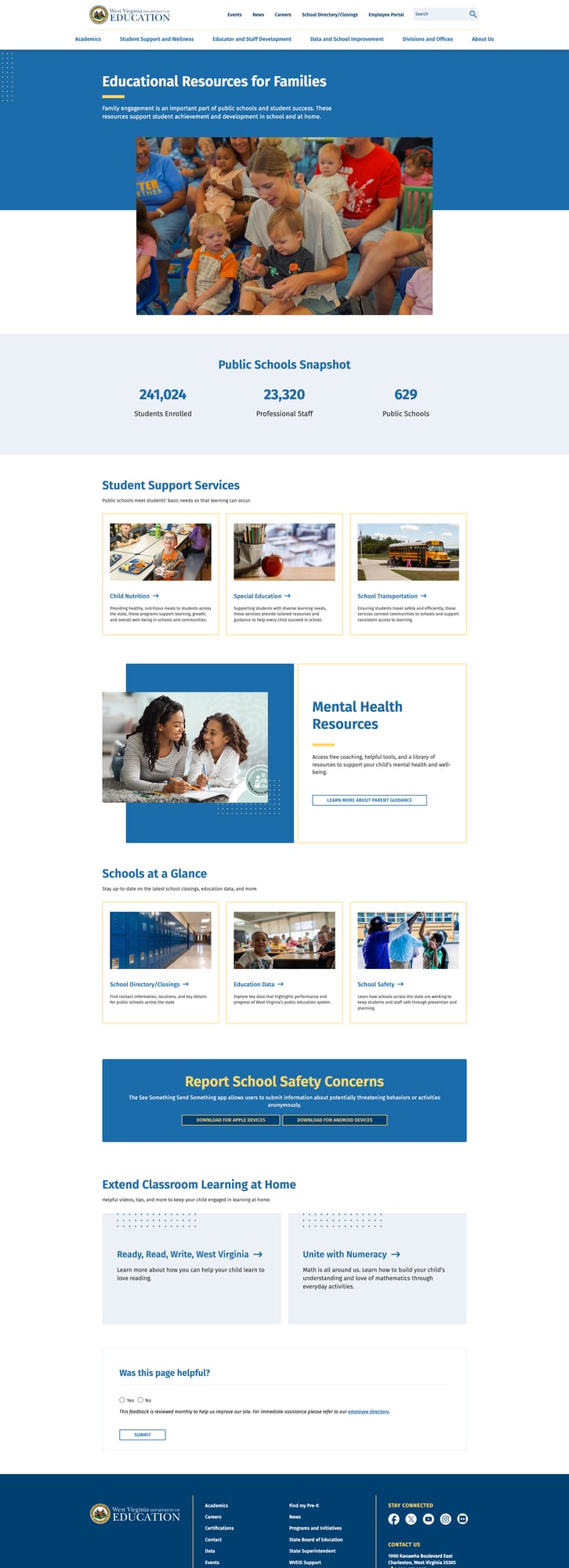
The Educational Resources for Families page is a model for how SEA sites should serve parents. It opens with a "Public Schools Snapshot" showing key statistics (241,024 students enrolled, 23,320 professional staff, 629 public schools), then organizes content into clear sections: Student Support Services (Child Nutrition, Special Education, School Transportation), Mental Health Resources with direct links to counseling tools, a "Schools at a Glance" section linking to the School Directory and Education Data, and a "Report School Safety Concerns" feature promoting the See Something Send Something app for both iOS and Android. The page closes with "Extend Classroom Learning at Home" resources including Ready, Read, Write, West Virginia and Unite with Numeracy programs.
3. Robust Site-Wide Search
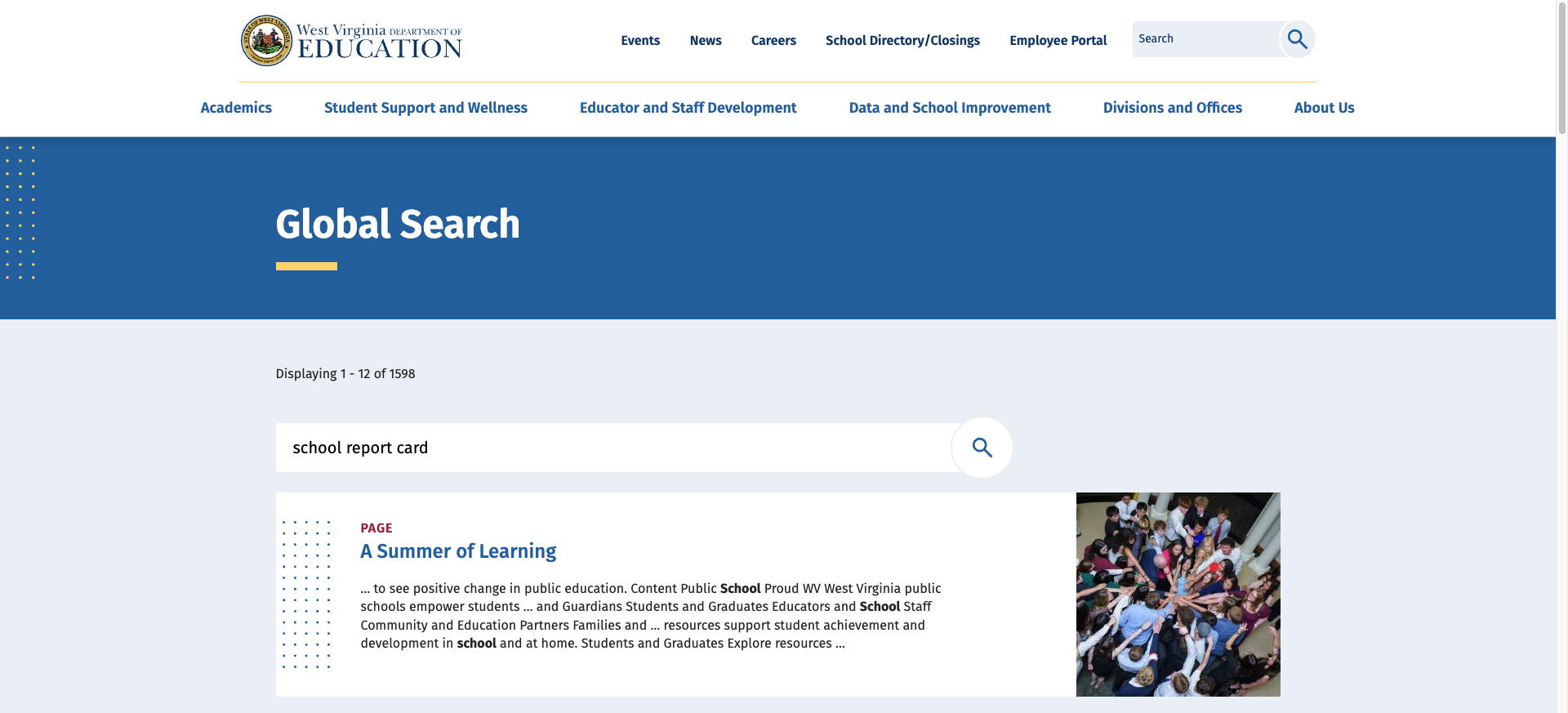
The Global Search (powered by Drupal's Search API) indexes over 1,598 pages and returns results with content-type labels, excerpt snippets with keyword highlighting, and thumbnail images. For a query like "school report card," the search returns paginated results across 134 pages. Each result card includes a category label (Page, Press Release, etc.), a title linking to the content, a contextual excerpt, and an associated image. While it lacks advanced features like faceted filtering or autosuggest, the core search experience is reliable and comprehensive — a notable achievement given how many state education sites have completely broken search.
4. Well-Structured Educator Resources
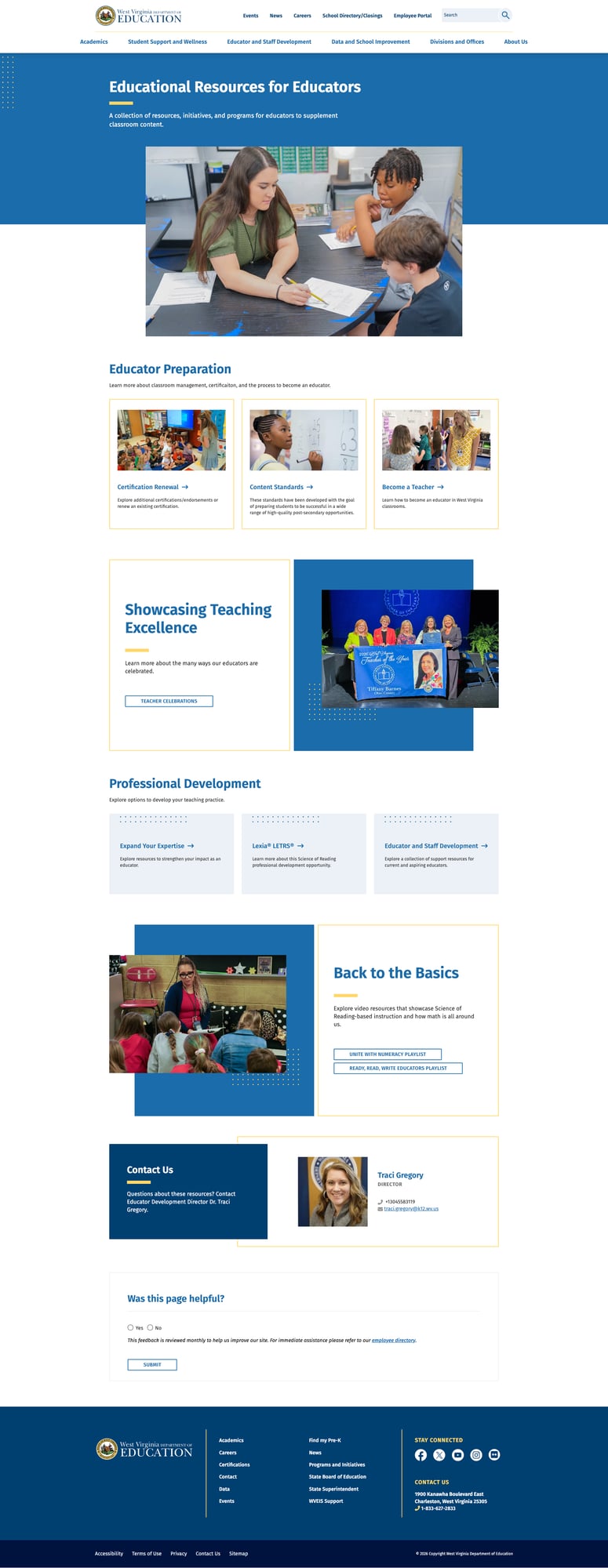
The Educational Resources for Educators page organizes professional content into logical sections: Educator Preparation (Certification Renewal, Content Standards, Become a Teacher), Showcasing Teaching Excellence with a link to Teacher Celebrations, Professional Development options (Expand Your Expertise, Lead² LETEP², Educator and Staff Development), and a "Back to the Basics" video resource section with Unite with Numeracy and Ready, Read, Write Educators playlists. The page includes direct contact information for the Educator Development Director (Traci Gregory) — a thoughtful touch that provides a human point of contact for questions.
The site also features a dedicated Artificial Intelligence guidance page, showing West Virginia is proactively addressing emerging EdTech topics.
5. Excellent Mobile Responsiveness and Performance
The site delivers a clean, fully responsive mobile experience. The desktop mega-menu collapses to a hamburger menu at mobile breakpoints, content blocks stack vertically, and all interactive elements remain easily tappable. The viewport meta tag is properly configured (width=device-width, initial-scale=1.0) without restrictive user-scalable=no that plagues some government sites.
Performance is exceptional: 92ms TTFB, 81KB HTML payload, multi-layer Varnish/Fastly CDN caching, HSTS with preload, CSP headers in both enforce and report-only modes, X-Frame-Options, and X-Content-Type-Options — one of the strongest security header implementations we've seen across all 50 states.

Weaknesses
1. Sparse Education Data Landing Page
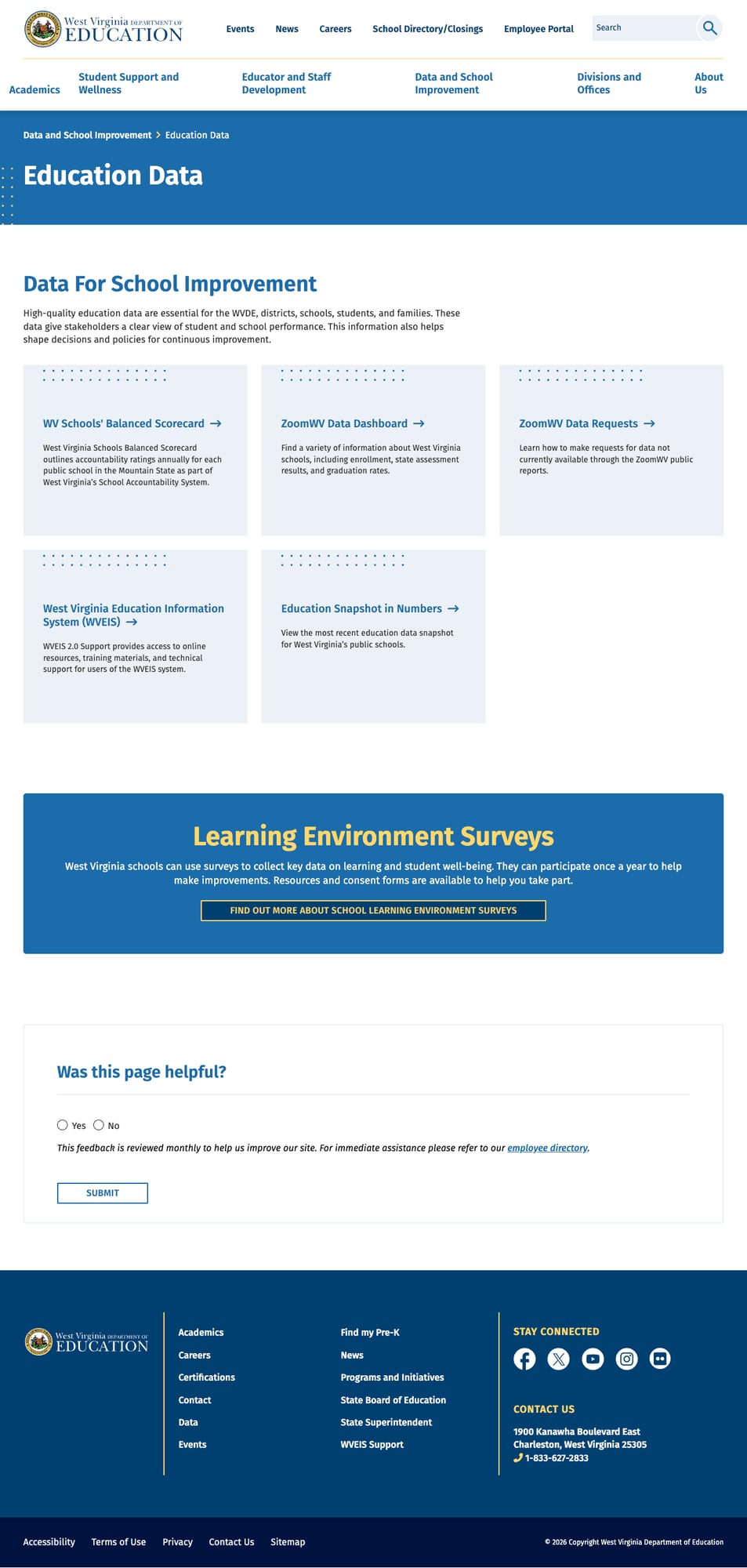
Despite strong external data tools (ZoomWV, Balanced Scorecard), the main site's Education Data page is disappointingly sparse — just five link cards pointing to external tools and a PDF infographic. There are no inline dashboards, no downloadable CSV/Excel datasets, no interactive visualizations, and no data dictionary or methodology documentation. The "Education Snapshot in Numbers" PDF was uploaded in November 2023 (based on the file path), making it potentially outdated. Users looking for downloadable data must navigate to ZoomWV, which itself has a learning curve. For such a strong technical foundation, the data presentation on the main site feels underdeveloped.
2. Complete Absence of Multilingual Support
West Virginia's site offers zero multilingual support — no Google Translate widget, no language selector, no translated content, and no directions to translation services. While West Virginia has a smaller English Learner population than some states, the 2020 Census showed approximately 2.6% of households speaking a language other than English at home, and the state's growing immigrant workforce in industries like healthcare and energy makes this a gap worth addressing. No SEA site should assume 100% English fluency among its audience of parents, students, and community members.
3. Search Lacks Filtering and Autosuggest
While the search returns comprehensive results, it offers no way to filter by content type (pages, press releases, events), date range, or topic area. There's no autosuggest/typeahead as users type, no sort options (relevance, date, alphabetical), and no advanced search capability. With 1,598+ indexed pages, users searching for specific content types (say, only policy documents or only press releases) must manually scan through pages of mixed results. The search form also uses a text parameter rather than the standard q or search, which could affect bookmark sharing.
4. Heading Hierarchy Inconsistencies
The homepage uses multiple <h1> tags — the hero section uses <h1> for "A Summer of Learning" which is appropriate, but the "Explore Resources for Every Role" carousel also uses <h1> for each item (Families and Guardians, Students and Graduates, etc.). Best practice reserves <h1> for a single page title, with subsequent headings following a logical h2→h3→h4 hierarchy. This affects both screen readers and SEO, as it creates ambiguity about the page's primary topic.
Opportunities
1. Embed Interactive Data Visualizations On-Site
Rather than sending users entirely to ZoomWV for data exploration, WVDE could embed summary dashboards or key metrics directly on the Education Data page. Even a few interactive charts showing enrollment trends, graduation rates, and assessment results over time would dramatically improve the data experience without replacing ZoomWV as the deep-dive tool.
2. Add Basic Multilingual Support
Implementing Google Translate or a similar widget would be a low-effort, high-impact improvement. At minimum, the family resources page and key parent-facing content should be available in Spanish. Several other states (Georgia, Florida, Kentucky) have shown that even a simple language toggle significantly improves accessibility for non-English-speaking families.
3. Enhance Search with Faceted Filtering
The existing Drupal Search API infrastructure could support faceted search (filter by content type, date, topic) without a major platform change. Adding Solr or Elasticsearch-backed facets would leverage the already well-indexed content and let users quickly narrow 1,598+ results to exactly what they need.
Threats
1. External Tool Dependency
WVDE relies heavily on external systems hosted on wveis.k12.wv.us and zoomwv.k12.wv.us for core data functions. These tools have distinct visual designs and navigation that create a fragmented user experience. If these systems experience downtime or are retired without the main site adapting, users would lose access to critical accountability data.
2. Accessibility Compliance Gaps
While the site has good foundational accessibility (ARIA landmarks, skip navigation, alt text, semantic HTML), the heading hierarchy issues and reliance on carousel navigation for the "Explore Resources" section could create barriers for screen reader users. The accessibility page acknowledges the site is in a "process of redesigning" for accessibility compliance — suggesting the team knows there's work to be done.
Standout Feature
The WV Schools' Balanced Scorecard (wveis.k12.wv.us/essa/dashboard.html) is West Virginia's standout feature. It presents current 2024-2025 school year accountability data in a clear, visual format that communicates school performance at a glance. The dashboard shows state-level statistics (240,530 total enrollment, 92.3% attendance, 92.58% graduation rate), lists all state public charter schools, and breaks down Academic Achievement, Academic Progress, English Learner Progress, Attendance, and Behavior metrics for elementary/middle and high schools using an intuitive color-coded system (Exceeds Standard through Does Not Meet Standard). The inclusion of a "Download Data Set" option and detailed methodology links demonstrates a commitment to transparency. It also uniquely identifies whether schools meet their annual targets with clear checkmark indicators.
Bottom Line
West Virginia's WVDE website is a technically polished, well-organized state education portal that gets the fundamentals right. Parents will find a dedicated resource hub with support services and safety tools; educators will find certification, professional development, and emerging AI guidance; data users will find comprehensive school-level data through ZoomWV and the Balanced Scorecard. The site's main limitations — no multilingual support, a bare-bones data landing page, and search without filters — are all addressable improvements that would elevate an already solid platform into a top-tier state education website.
Grade Breakdown
| Criterion | Weight | Score | Notes |
|---|---|---|---|
| Navigation & Information Architecture | 15% | 8/10 | Clean mega-menu with 6 sections, all links functional, breadcrumbs, audience-based resource hubs, sitemap |
| Accessibility (WCAG 2.1 AA) | 15% | 7/10 | Strong ARIA landmarks, skip nav, descriptive alt text, accessibility page with grievance procedure; heading hierarchy issues with multiple h1 tags |
| Search Functionality | 10% | 6/10 | Drupal Search API with 1,598+ indexed pages, pagination, result cards with excerpts; no filters, autosuggest, or sort options |
| Mobile Responsive Design | 10% | 8/10 | Fully responsive, hamburger menu, proper viewport, no horizontal scroll, touch-friendly targets |
| Data Transparency & Open Data | 10% | 7/10 | ZoomWV (11 data categories), Balanced Scorecard (2024-2025 data), WVEIS; sparse main-site data page, Education Snapshot PDF from 2023, no inline downloads |
| Parent Resources | 10% | 7/10 | Excellent dedicated family page with stats, support services, mental health, safety app; zero multilingual support |
| Educator Resources | 10% | 8/10 | Well-organized with certification, PD, AI guidance, e-Learning, video resources, direct staff contact |
| Visual Design & Branding | 10% | 8/10 | Professional Gesso theme, consistent navy/gold branding, good imagery with alt text, clear visual hierarchy |
| Performance & Load Speed | 10% | 9/10 | 92ms TTFB, Fastly CDN, Varnish caching, HSTS w/ preload, CSP, strong security headers |
| Overall | 100% | 76/100 | B- |
Discussion