OverviewAll statesNorth Carolina
76/100
Grade: B- — A Solid State Platform Anchored by Exceptional Data Tools
North Carolina's Department of Public Instruction (NCDPI) website at dpi.nc.gov serves the state's 1.5 million public school students across 115 school districts. Built on NC's Digital Commons platform (Drupal 10), the site delivers a well-organized, audience-segmented experience that channels visitors efficiently to educators, families, districts, and data resources.
The site's crown jewel is its data ecosystem. The NC School Report Cards tool — powered by SAS and hosted at a separate domain — provides an interactive county map with drill-down to individual schools, covering 10 years of performance data across 25+ categories. Combined with CEDARS, EDDIE, and downloadable research datasets, North Carolina offers one of the more comprehensive data transparency packages we've reviewed. Performance is exceptional, with a 57ms time-to-first-byte that makes it among the fastest state education sites in the country.
Where the site falls short is in visual polish and consistency. The homepage's above-the-fold real estate is consumed by four oversized achievement seal graphics — impressive stats, but they push practical navigation below the fold. Some landing pages use modern card-based layouts while others (like Parent's Corner) remain bare bullet lists. Search is functional via Google Custom Search Engine but lacks autosuggest, filters, or any modern discovery features.
Strengths
1. Outstanding Data Transparency Ecosystem
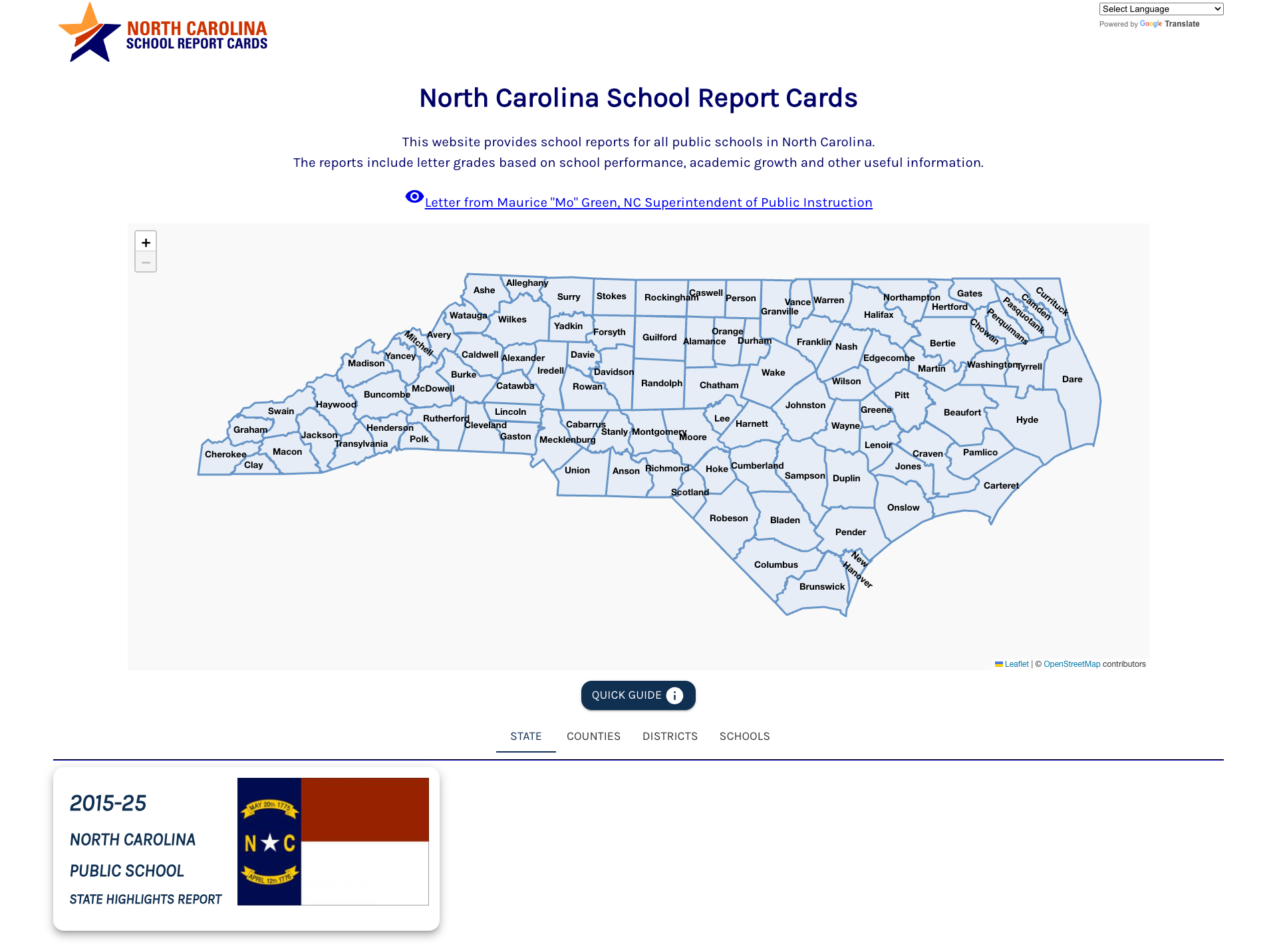
North Carolina provides one of the most comprehensive data ecosystems of any state education agency. The School Report Cards page lists 25+ data categories in the 2023-24 report card — from historical school performance grades and test scores to school safety data, chronic absenteeism by subgroup, per-pupil expenditure, and arts education indicators. The external NC School Report Cards tool (built on SAS) features an interactive Leaflet map of all 100 NC counties with drill-down at state, county, district, and school levels. Research datasets are available as downloadable zip files with data dictionaries via the Resources for Researchers page. Additional data tools include CEDARS (Common Education Data Analysis and Reporting System), EDDIE (Educational Directory and Demographical Information Exchange), and the Student Statistical Profile.
2. Well-Organized Audience Segmentation
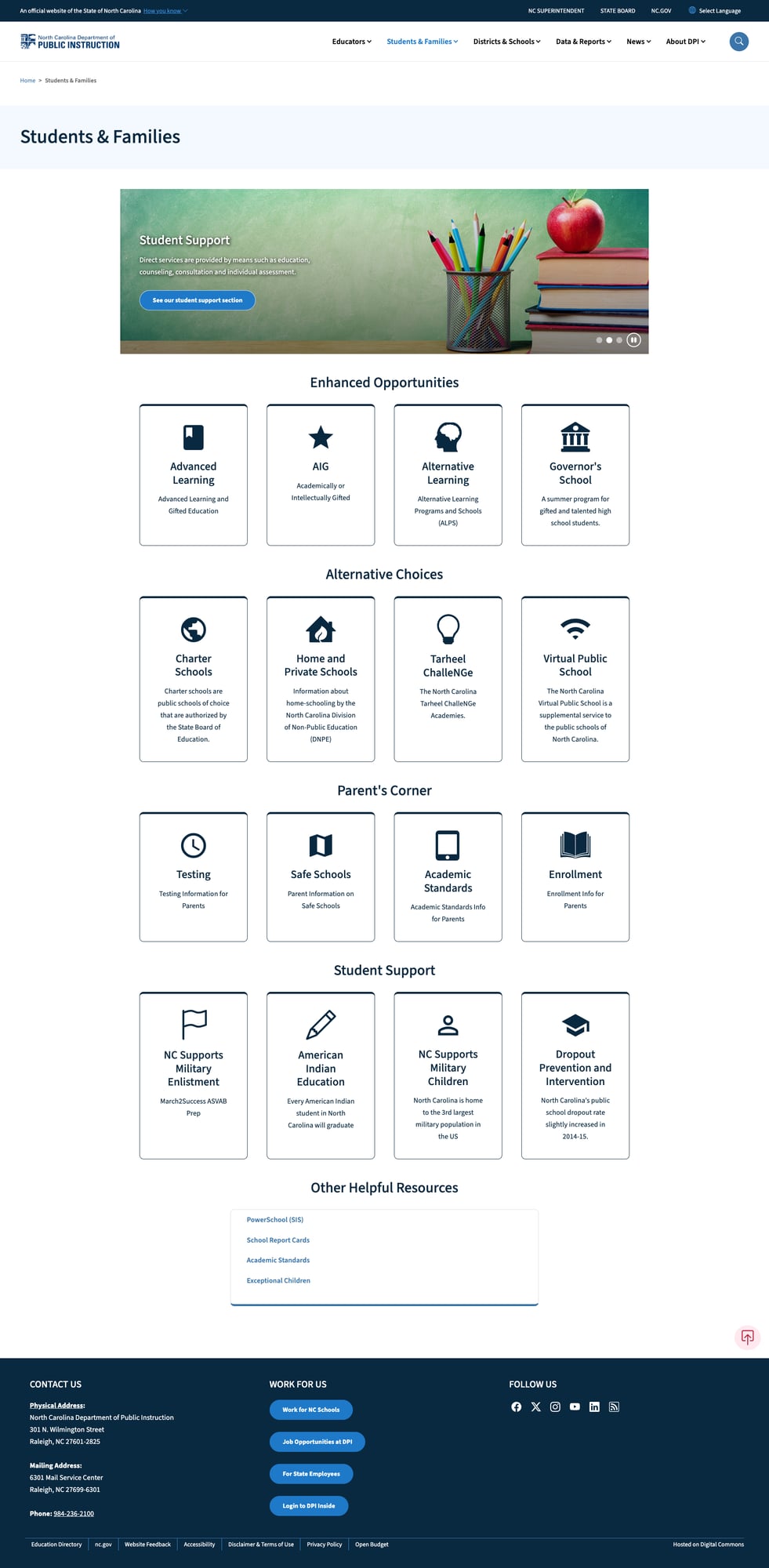
The site's information architecture cleanly segments content by audience: Educators, Students & Families, Districts & Schools, Data & Reports, News, and About DPI. The Students & Families landing page is a standout — organized into card-based sections for Enhanced Opportunities (Advanced Learning, AIG, Alternative Learning, Governor's School), Alternative Choices (Charter Schools, Home/Private Schools, Tarheel ChalleNGe, Virtual Public School), Parent's Corner (Testing, Safe Schools, Academic Standards, Enrollment), and Student Support (Military Families, American Indian Education, Dropout Prevention). Each section provides clear descriptions alongside visual icons, making it easy for parents to find relevant resources.
3. Comprehensive Educator Resources
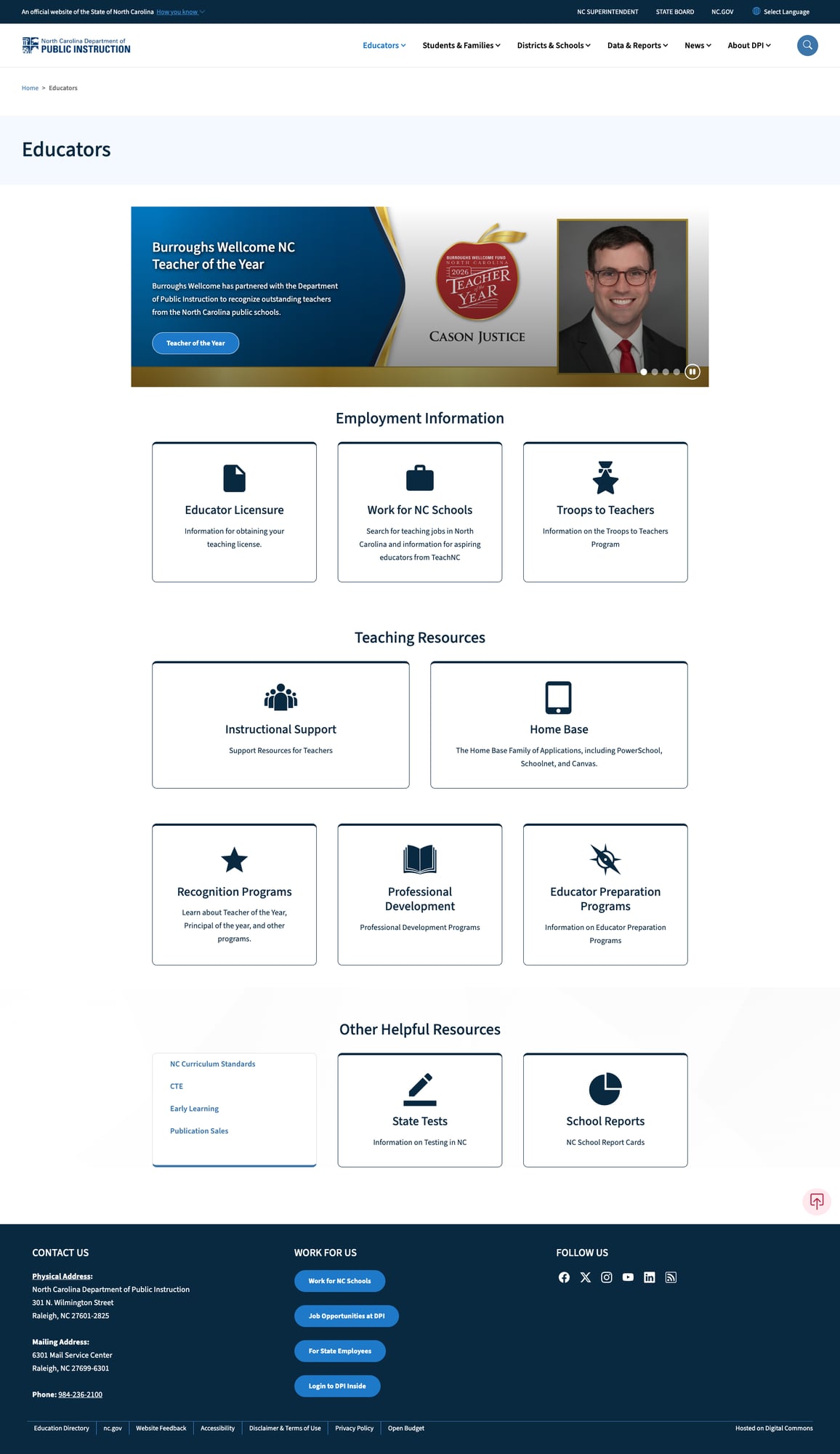
The Educators section provides a rich, well-organized hub covering the full educator lifecycle. Employment Information includes Educator Licensure, Work for NC Schools (job search), and Troops to Teachers. Teaching Resources features Instructional Support and NCED Connect (formerly Home Base — PowerSchool, Schoolnet, Canvas). Recognition Programs, Professional Development, and Educator Preparation round out the offerings. The section also links to TeachNC (the state's recruitment tool), National Board Certification resources, and specialized instructional support for school counselors and social workers. Quick links to NC Curriculum Standards, CTE, Early Learning, and State Tests provide convenient cross-references.
4. Excellent Mobile Responsiveness and Performance
The site delivers outstanding technical performance. Built on Bootstrap 5.1.3 via NC's Digital Commons platform, it features a proper responsive viewport meta tag, hamburger menu at mobile widths, and content that reflows cleanly across devices. The homepage achievement seals stack vertically on mobile without horizontal scroll. Time-to-first-byte is an exceptional 57ms with 82ms total page load — among the fastest we've measured. Security headers include HSTS (with preload), Content Security Policy, and X-Content-Type-Options. The site runs on Drupal 10 with Google Analytics (GA4) for tracking.

5. Strong Multilingual Support
The site integrates GTranslate with 16 languages in a persistent dropdown selector at the top of every page: English, Arabic, Traditional Chinese, Hindi, Polish, Portuguese, Russian, Spanish, Serbian, Vietnamese, Thai, Hmong, Khmer, Lao, Somali, and Amharic. This language selection reflects North Carolina's actual immigrant demographics, including Southeast Asian and East African communities. The NC School Report Cards external tool also includes its own Google Translate integration.
Weaknesses
1. Basic Search Without Modern Features
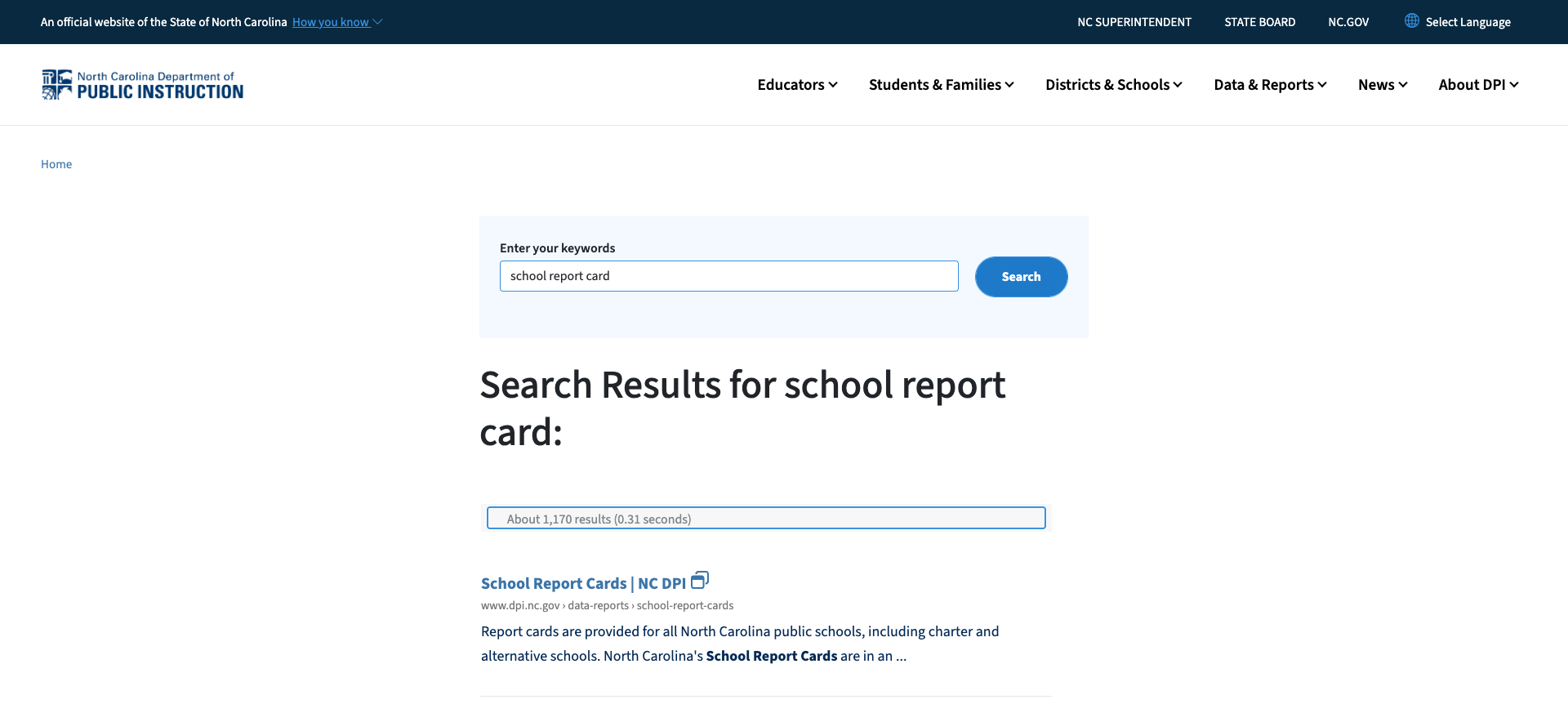
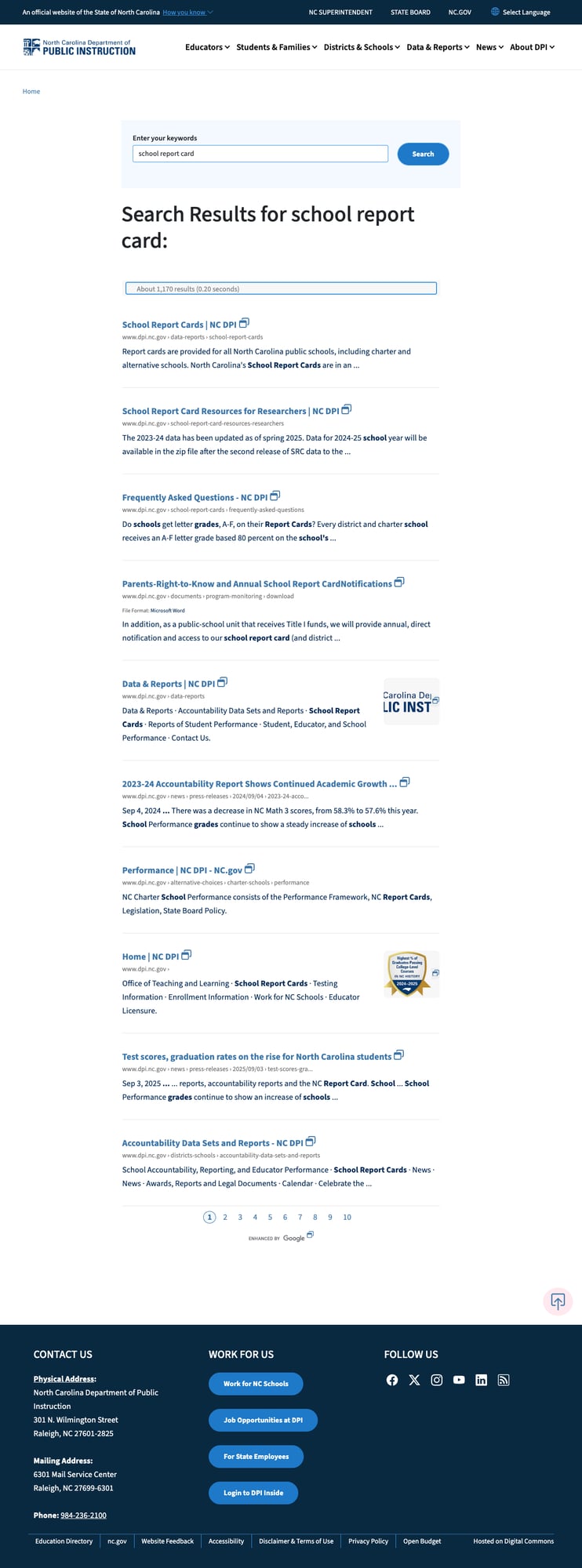
Site search uses Google Custom Search Engine, which returns relevant results (approximately 1,170 for "school report card") and provides paginated results across 10+ pages. However, it lacks modern discovery features: no autosuggest/autocomplete, no faceted filters (by content type, date, topic), no spelling correction, and no trending queries. The search page itself is plain — a single text input and button with no guidance or popular searches. For a site serving 1.5 million students' families, educators, and administrators, the search experience is functional but leaves significant room for improvement.
2. Homepage Prioritizes Self-Promotion Over User Tasks
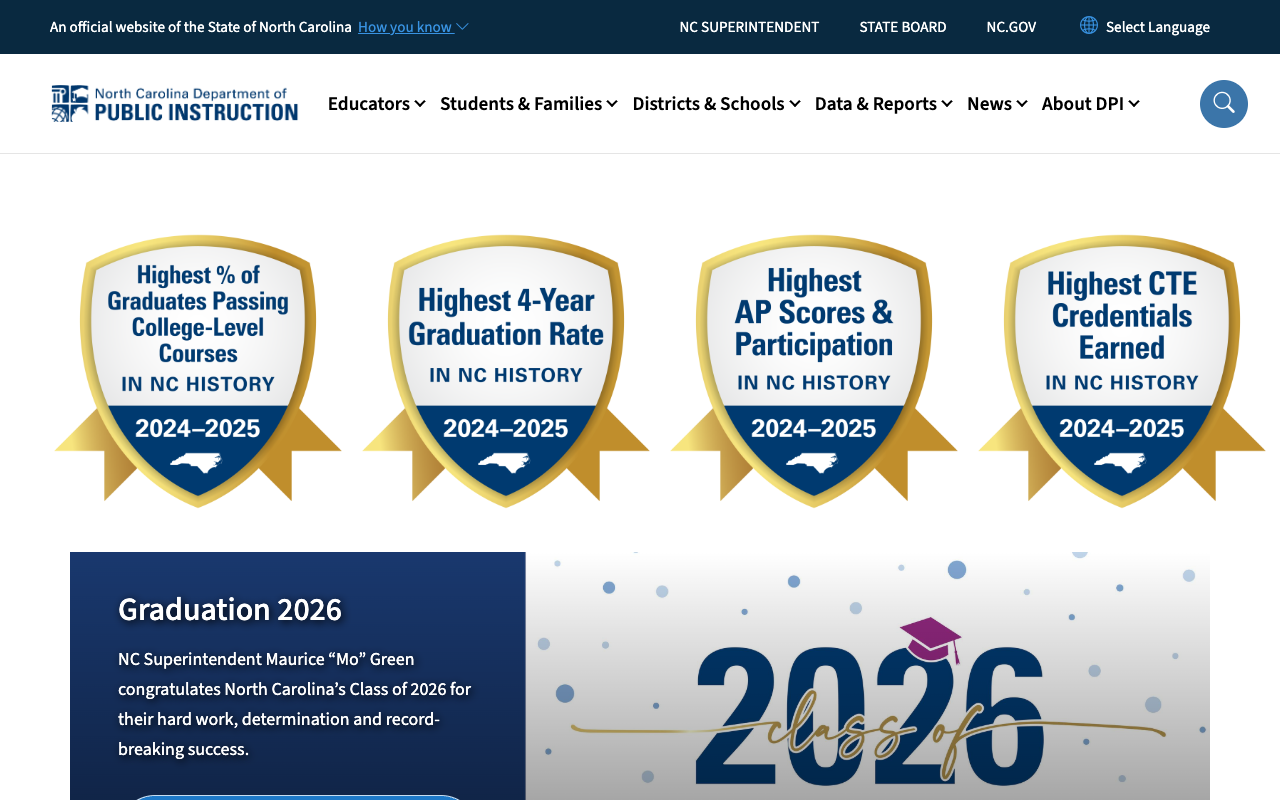
The above-the-fold content on the homepage is dominated by four large gold-and-blue achievement seal graphics celebrating "Highest % of Graduates Passing College-Level Courses," "Highest 4-Year Graduation Rate," "Highest AP Scores & Participation," and "Highest CTE Credentials Earned" — all for 2024-2025. While these are genuinely impressive accomplishments, they consume the most valuable screen real estate on the site. A first-time parent visiting to find enrollment information, a teacher looking for licensure details, or a district administrator checking report cards must scroll past this promotional banner before reaching any actionable content. The news carousel and quick-link cards that follow are well-designed but are pushed below the fold on most screens.
3. Inconsistent Landing Page Design
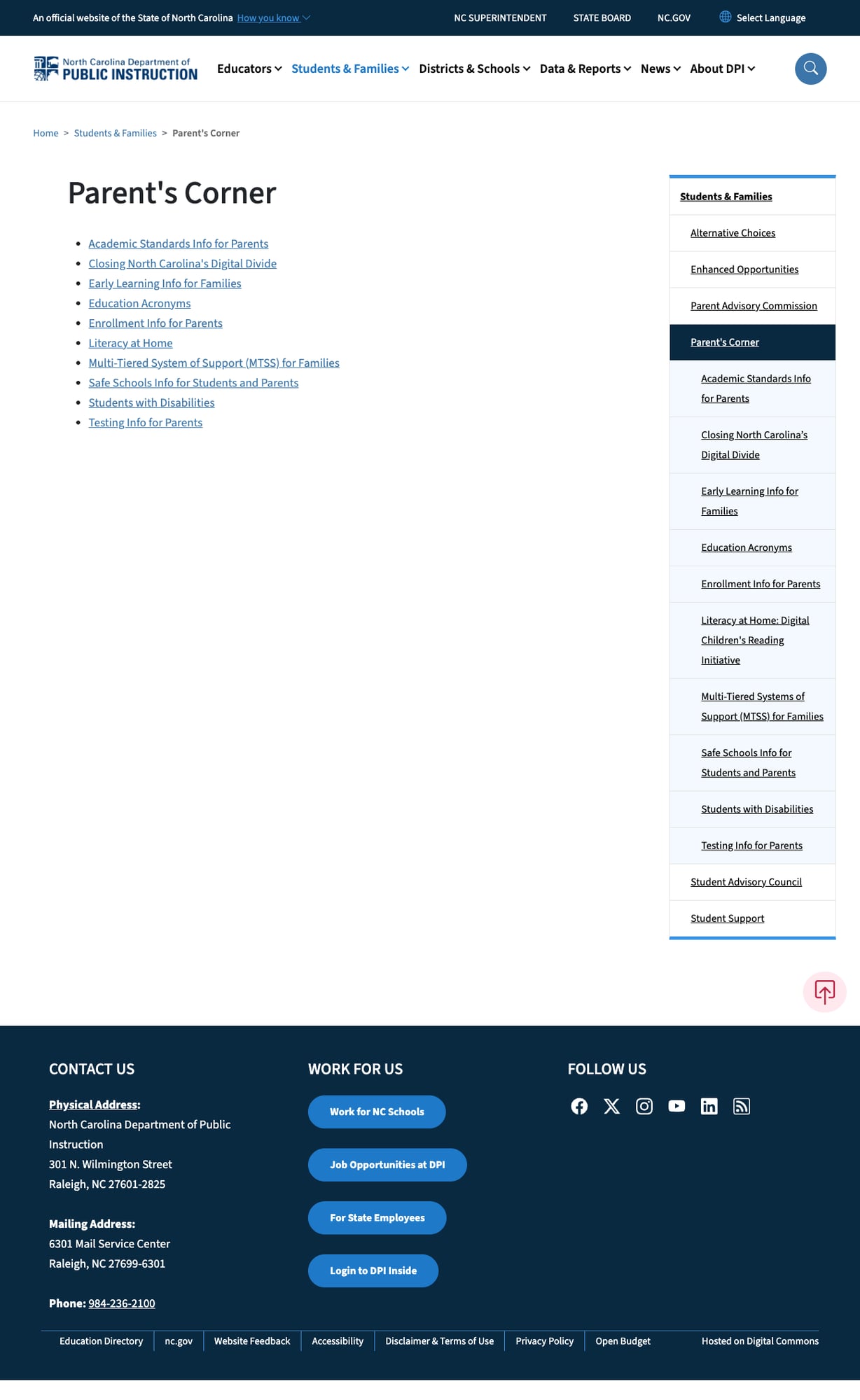
While the Students & Families and Educators landing pages use attractive card-based layouts with icons and descriptions, other key sections present a stark contrast. The Parent's Corner page — a critical destination for families — is a bare bullet list of 10 links with no descriptions, no icons, and no visual hierarchy. Compare this to the rich card layout on the Students & Families parent page that contains the same links but with descriptive text and visual affordances. This inconsistency extends across the site: some sections have rich landing pages while others are minimal link lists, creating an uneven user experience depending on which path a visitor takes.
4. External Data Tools Are Visually Disconnected
The NC School Report Cards tool (hosted at ncfvapublicprod.ondemand.sas.com) is functionally excellent but visually disconnected from the main DPI site. It uses a completely different design language — different header, different typography, different color treatment. Users clicking from the DPI site are transported to what feels like a separate application. Similarly, the EDDIE and Student Statistical Profile tools each have their own visual identity. While cross-domain data tools are common in state government, the lack of any visual continuity (even a matching color scheme or header bar) can confuse parents who may not realize they're still looking at official state data.
Opportunities
Implement a modern search experience — Replace or augment Google CSE with a search that includes autosuggest, content-type filters (forms, data, news, policies), and popular queries. A parent searching for "kindergarten enrollment" and a researcher searching for "test score data" have very different needs that faceted search could address.
Redesign the homepage to be task-oriented — Move achievement stats to a secondary banner or "Highlights" section. Replace the above-the-fold area with task-based entry points: "Find my school's report card," "Apply for a teaching license," "Enroll my child," "Access data." This would serve the site's primary audiences rather than showcasing metrics.
Standardize landing page templates — Apply the card-based layout from Students & Families and Educators to all section landing pages (Parent's Corner, Data & Reports sub-sections, etc.) for a consistent user experience. The Drupal 10 platform supports template standardization.
Threats
Platform dependency on SAS for School Report Cards — The most critical public-facing data tool is hosted on a third-party SAS platform (ncfvapublicprod.ondemand.sas.com). Any contract changes, SAS platform migration, or service disruption would directly impact North Carolina's ability to provide school performance data to parents and researchers. The "analytic section" was already decommissioned in 2020, suggesting data tool transitions can be disruptive.
Promotional content may erode trust with diverse audiences — The heavy emphasis on achievement superlatives ("highest in NC history") across the homepage, while factually accurate, may create skepticism among parents in struggling schools or districts. Education advocacy groups could perceive the homepage as more public relations than public service.
Standout Feature
The NC School Report Cards tool is the clear standout. Built on SAS Visual Analytics, it presents an interactive Leaflet map of all 100 North Carolina counties, allowing users to drill down from state → county → district → school level. The 2015-25 State Highlights Report provides a decade of longitudinal data. Categories span academic performance, school safety, educator qualifications, financial data, and more. Google Translate is integrated directly into the tool. A Quick Guide helps new users navigate the interface. Downloadable datasets with data dictionaries serve the research community. This is one of the most comprehensive school report card implementations we've reviewed across all states.
Bottom Line
North Carolina's DPI website is a well-built, well-maintained state education platform that excels in data transparency and audience organization. Parents will find school performance data through the excellent Report Cards tool, educators will find licensure and professional development resources well-organized, and researchers will appreciate downloadable datasets with documentation. The site loses points for a self-promotional homepage, inconsistent landing page design, and basic search. But with exceptional performance (57ms TTFB), zero broken links, 16-language support, and one of the strongest school report card tools in the country, North Carolina delivers a solid B- experience that serves its large and diverse education community competently.
Grade Breakdown
| Criterion | Weight | Score | Notes |
|---|---|---|---|
| Navigation & Information Architecture | 15% | 8/10 | Clean 6-item nav with dropdowns, breadcrumbs throughout, audience-segmented IA, section menus on sub-pages, 100% link health |
| Accessibility (WCAG 2.1 AA) | 15% | 8/10 | Skip-to-content, ARIA labels, alt text on all images, proper viewport, no user-scalable restrictions, NC Digital Commons platform standards |
| Search Functionality | 10% | 6/10 | Google CSE returns relevant results (~1,170), paginated, but no autosuggest, no filters, no faceted search, plain interface |
| Mobile Responsive Design | 10% | 8/10 | Bootstrap 5.1, responsive viewport, hamburger menu, content reflows cleanly, seals stack vertically |
| Data Transparency & Open Data | 10% | 9/10 | Outstanding: SAS-powered School Report Cards with interactive map, 10-year data, 25+ categories, CEDARS, EDDIE, downloadable datasets with dictionaries |
| Parent Resources | 10% | 6/10 | Students & Families landing page excellent; Parent's Corner is bare link list; enrollment, testing, academic standards, literacy initiative, MTSS content solid |
| Educator Resources | 10% | 8/10 | Comprehensive: licensure, jobs (Work for NC Schools), NCED Connect, professional development, recognition programs, TeachNC, specialized support |
| Visual Design & Branding | 10% | 6/10 | Consistent blue/gold/white NC branding, but homepage dominated by achievement seals; inconsistent landing page templates; external tools visually disconnected |
| Performance & Load Speed | 10% | 9/10 | Exceptional 57ms TTFB, 82ms total; HSTS with preload, CSP, Drupal 10 on Digital Commons; Google Analytics GA4 |
| Overall | 100% | 76/100 | B- |
Discussion